
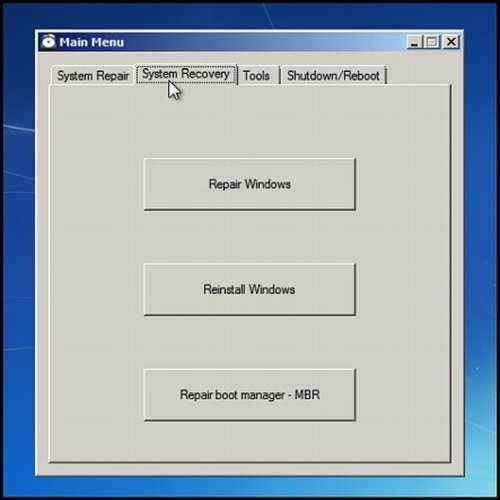
File Size : 128 Mb
OEM Recovery Partition Creator, for advanced users, can create a copy of your partition and bootable rescue media to restore your computer to its original state. The idea behind the app is to be able to create a factory restore just like the one that comes with Dell, HP, and others. However, if you're not an advanced user, and possibly even if you are, you might not know where to begin or how to use the program. The documentation is massive, and could easily be replaced with a graphical user interface.
Upon extraction, you are told that the files are only going to be extracted. What you get is seven new folders, all for different operating systems, documentation(you're going to need it), add-ons and sources. If you're anything like me, you're a little surprised, confused and lost at this point and you haven't even started.
Features (All Windows versions)
Create a complete image of the Windows installation
Official Microsoft method for system recovery on Windows
Make use of built-in Windows 7/8/10 software
Translation required for the menu - French, English included
Bit-Locker is supported
Support for UEFI/GPT
Off-line file browsing
Source code included for nearly everything
Based on CMD scripts with AutoIT gui
Works for 32 and 64 bits version of Windows
Instructions included
Support the creation of a recovery USB drive
Support the option to create DVD recovery media (version 3.0.0 and up only)
Support non-destructive and destructive recovery
Features (Windows 7 and 10 only)
Offline registry access via REGEDIT in Recovery Environment
Offline notepad access in Recovery Environment
Features (Windows 8/8.1 only)
Support the creation of a custom "Refresh" image
Required files which are not included
Windows 10
You need to provide the 32bits and 64bits versions of ScanState
Windows 8
You need to provide boot files (BOOT and EFI folder and BOOTMGR and BOOTMGR.EFI file) from the DVD
You need to provide the 32bits version of OsCdImg.exe file
Windows 7
You need to provide the 32bits and the 64bits versions of ImageX.exe
You need to provide the 32bits version of OsCdImg.exe file
HomePage:
https://www.anarethos.com
Download
OEM Recovery Partition Creator 6.0.2
Size: • Version:
Archive password: Password not set
