
File size: 7.1 MB
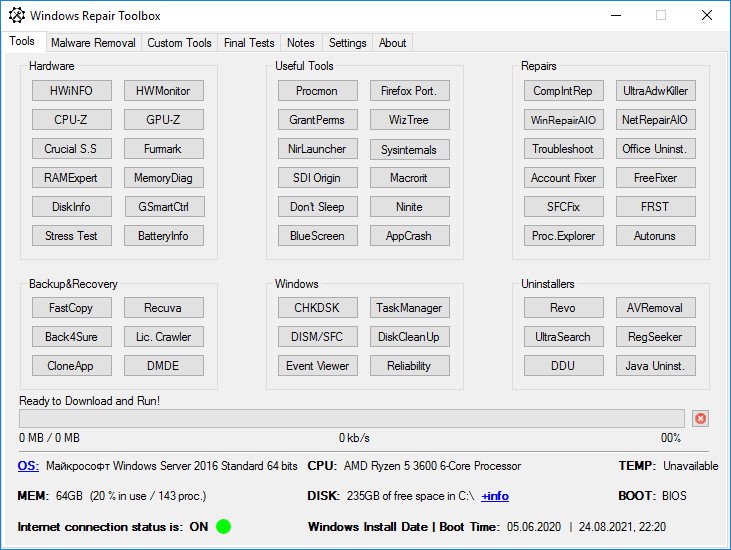
Windows Repair Toolbox is a software created to help you repair a Windows system, by making the process faster, easier and uniform.
Features
- Ability to download all the tools at once (and to keep them updated) with 1-click so that you can use the toolbox in offline computers, or simply to have all the tools already downloaded in advance.
- Ability to select several tools to run successively in unattended mode, to perform malware removal, system cleaning and repair. An email letting you know that the process is complete, and containing the logs, can be sent to you.
- Displays relevant information about the computer to be repaired: CPU temperature, name and % time; amount of RAM installed on the system and % of use; Disk model, capacity, basic health check; amount of free space left in the system partition; Windows edition and install date; System boot time; and more.
- Allows you to add your own favorite tools to the program.
- Allows you to change the program icon and title bar text.
- Allows you to perform quality assurance tests after the repair is complete.
- Allows you to save notes about the repair process.
- Provides 1-click access to some useful Windows tools.
Whats New
https://windows-repair-toolbox.com/changelog.txtHomePage:
https://windows-repair-toolbox.com/
Download
Windows Repair Toolbox 3.0.4.5
Size: • Version:
Archive password: Password not set
